 redevops.app
Download the app.
Signed installers for macOS, Windows and Linux. Notarized or Authenticode-signed, with the hash published next to every file, so you know what you got.
The desktop app ships today as Agentic Apps R0-prime: the same product this site calls rAIlsApps. Source-available: AGPL-3.0-or-later with the Commons Clause (see LICENSING.md in the release tag).
Not sure yet? Open a live demo in your browser first — no account, no install, sample data. This page is for when you want it on your own machine.
Pick your system
macOS
Apple silicon (Apple silicon only in this release)
Verify: Agentic.Apps.R0-prime_0.1.1_aarch64.dmg
sha256 58350f6c405c4a27e583a30623e4e9eb70c0893cd40935de90e9ca063c8ea5b3
Developer ID (ReDevOps.io LLC, Team Q8A92DM4T7), notarized and stapled. spctl reports source=Notarized Developer ID; xcrun stapler validate on the dmg succeeds.
Windows
x64
Verify: Agentic.Apps.R0-prime_0.1.1_x64-setup.exe
sha256 717e16c8de09cba8848d2de095559adb4734a579d9542bc00fe26b38a613c960
Authenticode, ReDevOps.io LLC, RFC 3161 timestamp. The installed launcher, sidecar and uninstaller are signed too.
Verify: Agentic.Apps.R0-prime_0.1.1_x64_en-US.msi
sha256 fccc2cfca364212c0cae4683e975bb5c045c3ddd6310a2d7f915dc398969e0e5
Authenticode, ReDevOps.io LLC, RFC 3161 timestamp. The installed launcher and sidecar are signed too.
As a new publisher the installer may show a SmartScreen reputation prompt. The signing certificates are short-lived; the timestamp is what keeps the signature valid afterwards.
Linux
arm64 only in this release; not individually signed, integrity rests on the signed manifest
Verify: Agentic.Apps.R0-prime_0.1.1_arm64.deb
sha256 6d32f36118c1b910fca0732dc14c4118909ec4f85858f449d79376ffb7357620
Checksum in the signed manifest.
Verify: Agentic.Apps.R0-prime_0.1.1_aarch64.AppImage
sha256 fbf99b3a68be4f2d19d3ea5f5bc8d07b2c0f63dc7b0440402826bea5b586bc1d
Checksum in the signed manifest.
GitHub shows file names with dots instead of spaces; the content and hashes are the ones published in the signed manifest. Files link to the official release.
Verify before you install
Every file's sha256 is listed above, taken from release-manifest.json, which carries a detached SSHSIG made with the release key SHA256:wUoE8wxKJpmtTH7GqWXMIl9/BW0SH1Isc5/w9HEiwqA. Check the manifest, then the file:
printf 'redevops-release namespaces="%s" %s\n' "redevops-qa-release@v1" "$(cut -d' ' -f1,2 release-signing-key.pub)" > allowed_signers
ssh-keygen -Y verify -f allowed_signers -I redevops-release -n redevops-qa-release@v1 -s release-manifest.json.sig < release-manifest.json
ssh-keygen -lf release-signing-key.pub        # SHA256:wUoE8wxKJpmtTH7GqWXMIl9/BW0SH1Isc5/w9HEiwqA
shasum -a 256 "<downloaded file>" # compare with the table belowManifest: release-manifest.json · signature · release-signing-key.pub. A CycloneDX SBOM per platform is attached to the release. The same files are published as public OCI artifacts (download with oras pull), with a CycloneDX SBOM per platform attached to the release.
ghcr.io/redevops-io/agentic-apps-desktop:0.6.1-macos-arm64ghcr.io/redevops-io/agentic-apps-desktop:0.6.1-windows-x64ghcr.io/redevops-io/agentic-apps-desktop:0.6.1-linux-arm64ghcr.io/redevops-io/agentic-apps-desktop:0.6.1-manifest
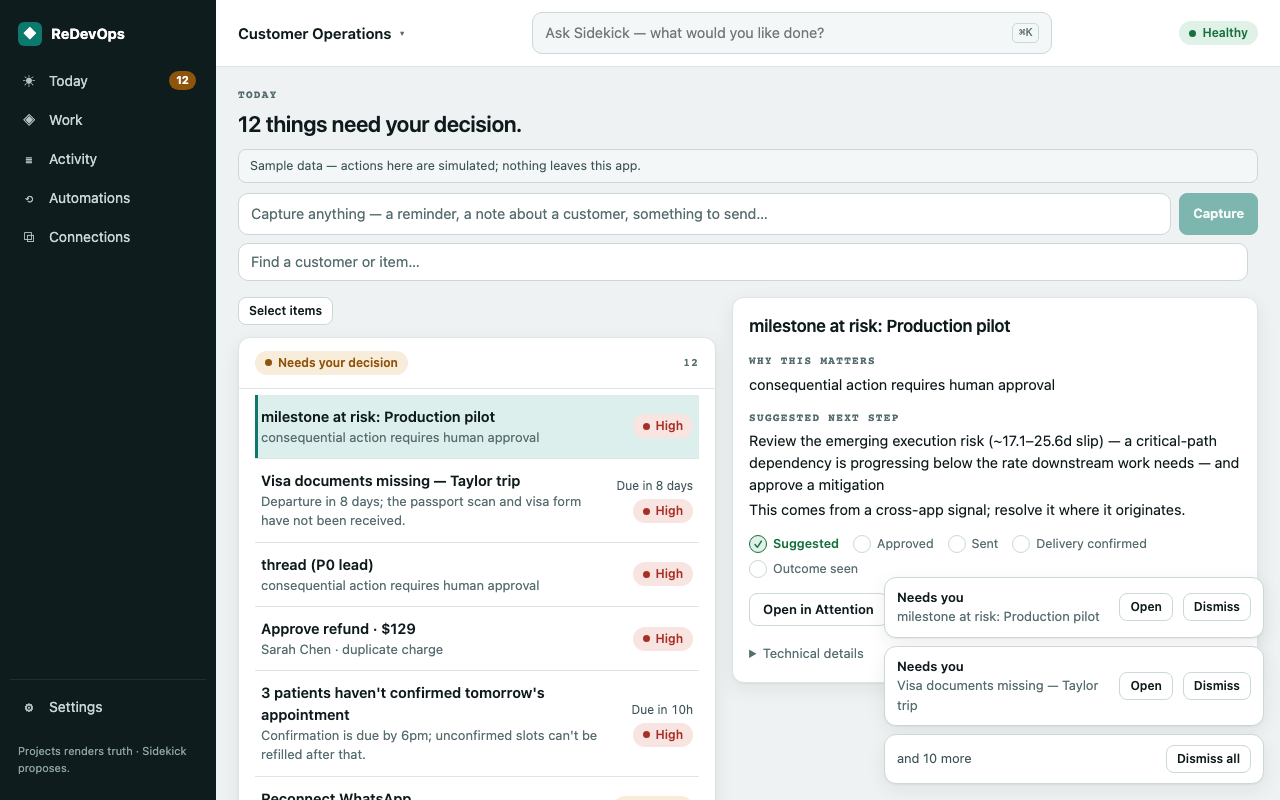
The app on one screen
This download is not the full business stack
Installing the app puts it on your machine. Running your whole business on it — the four business systems, your model, your accounts, on your server — is a separate, heavier install with access provisioning: Install the full business stack. You do not need the stack to try the app, and the app does not connect to anything until you tell it to.